
Kids Launcher - Parental Control and Kids Mode1.2.57 - Google Play
You'll be able to see results in few seconds.
Publisher Description

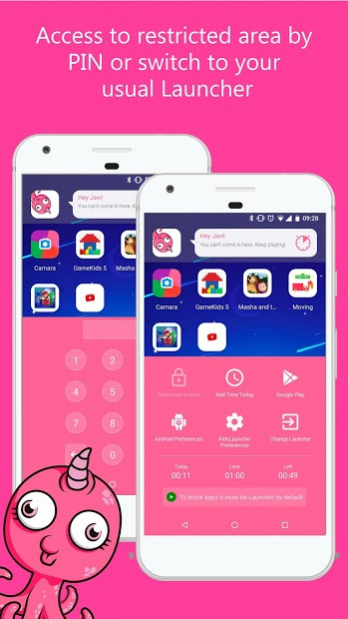
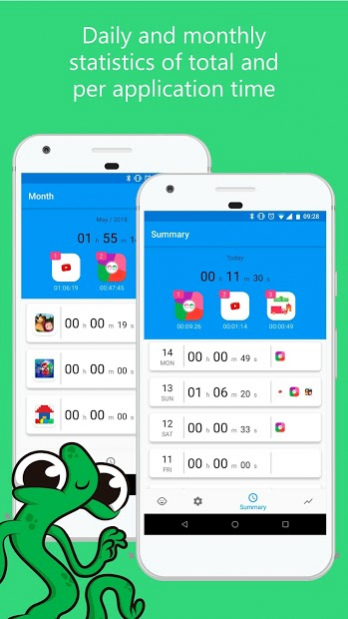
Kids Launcher is an application designed for parents who want their children to use their mobile or tablet responsibly👨👩👦👦. The parental control features of Kids Mode give parents a lot of flexibility on how to set up their phone and tablets to limit screen time; block ads and inappropriate content.
By configuring the application, we can keep our children in a safe area without access to applications or content that is not appropriate for them.
The characteristics of Kids Launcher:
★ Custom Start screen where you can access only the applications, photos or videos that you want
★ Set a time limit for the day and time to go to bed
★ Blocks access to applications that are not allowed
★ Remote Parental Control: Use Kids Launcher Remote to have control of everything your child does from your own mobile
★ If you share the device with the child, you can access blocked applications with the unlock PIN in a couple of steps
★ Daily and monthly statistics of total and per application time
★ The child will be notified 10 minutes before it is time to stop using the phone or tablet
★ Access to restricted area by PIN
★ Attractive interface based on Material Design
Kids Launcher contains mini applications adapted for children such as Color by Number, application for taking photos and editing using stickers or emoticons and a simple application for painting where the parent can propose new strokes or letters for the child to learn to draw them.
Kids Launcher offers a neat interface for children where colorful monsters will help you not to access inappropriate content, warn when the game time is ending and ensure the correct use of the mobile or tablet.👨❤️👨
About Kids Launcher - Parental Control and Kids Mode
The company that develops Kids Launcher - Parental Control and Kids Mode is Javi Pacheco. The latest version released by its developer is 1.2.57.
To install Kids Launcher - Parental Control and Kids Mode on your Android device, just click the green Continue To App button above to start the installation process. The app is listed on our website since 2020-12-16 and was downloaded 0 times. We have already checked if the download link is safe, however for your own protection we recommend that you scan the downloaded app with your antivirus. Your antivirus may detect the Kids Launcher - Parental Control and Kids Mode as malware as malware if the download link to com.kidslauncher is broken.
How to install Kids Launcher - Parental Control and Kids Mode on your Android device:
- Click on the Continue To App button on our website. This will redirect you to Google Play.
- Once the Kids Launcher - Parental Control and Kids Mode is shown in the Google Play listing of your Android device, you can start its download and installation. Tap on the Install button located below the search bar and to the right of the app icon.
- A pop-up window with the permissions required by Kids Launcher - Parental Control and Kids Mode will be shown. Click on Accept to continue the process.
- Kids Launcher - Parental Control and Kids Mode will be downloaded onto your device, displaying a progress. Once the download completes, the installation will start and you'll get a notification after the installation is finished.
Program Details
System requirements
Download information
Pricing
Version History
version 1.2.57
posted on 2020-12-16
Advertising has been removed for children and adults and Happy New Year 2021 to everyone!
version 1.2.56
posted on 2020-10-28
- Minor bugs fixed
version 1.2.53
posted on 2020-05-06
Now you can be the monster
Write down for your child the messages he or she will respond to in monster mode at each action. Make it more fun and personal when I have to go to bed or can't access an application.
version 1.2.44
posted on 2020-01-03
- New dialogs in the mini-apps to delete and exit
- Minor bugs fixed
version 1.2.42
posted on 2019-12-03
- New drawings for the Color By Number application
- Minor bugs fixed
version 1.2.35
posted on 2019-10-25
New mini-application color by number adapted for children
version 1.2.32
posted on 2019-10-01
Translated into Polish
version 1.2.28
posted on 2019-09-09
Add a new image as an avatar. You can customize the Launcher with your child's photo or an image of a character he or she likes
Disclaimer
Official Google Play Link
We do not host Kids Launcher - Parental Control and Kids Mode on our servers. We did not scan it for viruses, adware, spyware or other type of malware. This app is hosted by Google and passed their terms and conditions to be listed there. We recommend caution when installing it.
The Google Play link for Kids Launcher - Parental Control and Kids Mode is provided to you by apps112.com without any warranties, representations or guarantees of any kind, so access it at your own risk.
If you have questions regarding this particular app contact the publisher directly. For questions about the functionalities of apps112.com contact us.
